The customer's half of delivery day,
done before the appointment.
Between the signature and the keys, there are things only your buyer can do. The READY HUB Customer Portal gives them one secure place to do them — no account, no app, no password.
The tasks you can't do for them.
Most of the vehicle delivery process happens inside your building, where you control it. The parts that don't are the parts that push delivery dates.
"Is it ready yet?"
Status calls interrupt the people who could be moving the deal forward — and the answer is usually already in your system.
Documents in a dozen places
A licence photo in a text thread, a void cheque in someone's inbox, a policy page nobody can find on the day.
Found out at the appointment
The outstanding item nobody chased surfaces when the customer is standing in front of you, with no time left to fix it.
One link. No account to create.
The buyer gets a unique secure link and opens it on the phone they already have in their hand. Nothing to download, nothing to remember.
Secure Link Access
One link per delivery, opened with a one-time code.
Upload From a Phone
Photos or PDFs, straight from the camera roll.
Customer Checklists
The items on their side, ticked off as they go.
Confirm the Appointment
Where your store has appointment confirmation switched on.
It looks like your dealership, not like software.
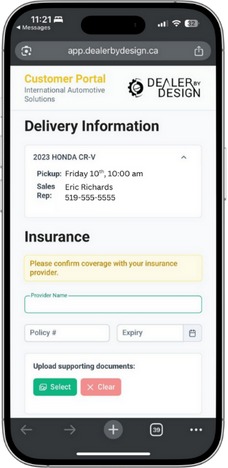
Past the verification step the portal carries your branding and shows the customer what they actually want to know: the vehicle they bought, when it's scheduled, who their salesperson is and how to reach them, and what's still outstanding on their side. The verification email that lets them in is sent under your dealership's name too. Most "is it ready yet" calls exist because nobody could answer that question without making one.
Why it matters: The customer stops chasing your team for status, and your team stops chasing the customer for paperwork.
Everything on their side, in one list.
Outstanding items stop being something the store remembers and start being something the customer can see.
- Submit insurance details — provider, policy number, expiry date
- Confirm the pickup appointment, or ask for a different time, where your store has that switched on
- Upload required documents securely from a phone
- Read messages you've written for them, and see their lienholder or lessor details
- Work through a customer-facing delivery checklist
- See who to contact — and the scheduled pickup date, if your store chooses to show it
Result: Less last-minute paperwork, fewer status calls, and a delivery appointment that starts with the keys instead of the admin.
How it works
Four steps, and only one of them is yours.
Send the link
The portal is created from the deal your team is already working in. The buyer gets their own secure link — nothing to set up on their end.
They open it on their phone
No account to create, no password to forget, no app to download. It opens in the browser they already have.
They work their list
Documents photographed and uploaded, insurance details entered, checklist items ticked off — at whatever hour suits them.
It becomes your work
What the customer sends lands on the deal, not in an inbox. Uploads attach to the task they belong to, and your team works them from the list they already have open. Insurance also emails the finance manager on that file.
The point of step 4: what the customer sends doesn't land in an inbox or a text thread. It lands on the deal, as work, on the same list your team is already working.
When what they send isn't right
A blurry licence photo and the wrong page of the policy are the classic "found out at the appointment" failures, so an upload task can be set to require review. The customer's upload shows as Pending review and the item stays unticked until someone signs it off — and you can limit who signs off to particular roles, so only F&I approves the void cheque if that's how your store works.
Reject it and the customer sees Review Rejected — Re-upload, with the upload button back in front of them. Your reason for rejecting stays internal — they get the status, not your commentary. A document that's already been approved can still be replaced, and a replacement goes back for review rather than inheriting the old approval.
The insurance step, closed before the day
Proof of insurance is the delivery item you have the least control over — and on a financed or leased deal, the finance company makes verifying it your responsibility. It is also the item most likely to fail quietly — the confirmation that reached a salesperson's phone instead of the file, and nobody notices until the customer is standing at the desk.
Where your store switches the insurance step on, the customer enters their provider, policy number and expiry date and attaches the document — a photo of the pink slip, a PDF from the broker, or several pages at once. Uploading it opens an Insurance Confirmation task on the deal, in the task list you nominate, and emails the finance manager on that file — so the confirmation lands where the next person will look for it, not in a text thread. Once someone ticks that task off, the customer can no longer edit what they submitted.
That sequence is the point. The step stops being something a store remembers and becomes something the deal tracks: a named task with an owner, a person who has to approve it, and a record that locks once they do. A vehicle doesn't leave on the assumption that somebody checked the coverage — it leaves because somebody did, and the file shows who and when.
That reduces insurance risk for two parties at once: the dealership, which carries the exposure if it releases a vehicle that turns out to be uninsured, and the finance or lease company, whose collateral it is. Both are relying on somebody having actually verified coverage before the keys change hands. This is the record that they did.
Most buyers already have a policy and simply attach it. The ones who don't are the reason deliveries slip — they mean to call a broker, the week goes, and nobody finds out until the appointment. Insurance quoting, which arrives later this year, gives that buyer a second way through the same step: a quote from a licensed brokerage without leaving the page. It's optional, it's the buyer's choice entirely, and it changes nothing for the customer who already has coverage. The dealership ends up with the same thing either way — a confirmed policy on the deal before the vehicle goes.
Why it matters: an outstanding item you ask about before the appointment can still be fixed. The same item discovered at the appointment cannot.
Wondering where the insurance requirement actually comes from, and what a dealership may and may not do about it in Ontario? See dealerships and auto insurance in Ontario.
"Does Friday at ten still work?"
The other question that costs a delivery is the appointment itself. A customer whose plans changed and who never got round to phoning becomes a no-show, a prepped vehicle nobody collects, and an afternoon of your team's work sitting idle.
Where appointment confirmation is switched on, the portal shows the scheduled pickup with two buttons: confirm the appointment, or request a different time. Requesting one opens a picker of slots you actually have open and a note field, so the reason arrives with the request instead of being reconstructed later. Once they confirm, the panel says so — and the option to ask for a different time stays available until the cutoff you set.
The guardrail that matters: a customer requesting a different time does not move the delivery. The scheduled appointment stands until someone at the dealership accepts the new time.
So it is a request, not a self-serve reschedule — your calendar stays yours. What changes is where the conflict shows up: the delivery is flagged “Change requested” on the calendar card and in the deal, with the time they asked for and their note in their own words, days before Friday instead of at ten o'clock on the day. It lands on the delivery for whoever opens it next rather than paging anybody, so refilling the slot still depends on someone watching the board.
The chasing happens without you
A portal only helps if people open it. Sending the first request is one click on the delivery — and once that message has actually gone out, the follow-up runs on its own.
- The insurance request goes out by text and email at the same time, carrying the name of the finance manager on the deal, so a reply goes back to that person rather than to a no-reply address
- If nothing comes back, the portal asks again at 8:00 the morning before pickup, and once more on the morning of — in your store's own time zone, never in the middle of the night
- The moment the customer submits, the outstanding reminder is cancelled. Move the delivery and the reminders move with it; unschedule it and they're called off
- Every message the portal sends is logged per customer and per channel, with what happened to it: sent, delivered, bounced, or skipped and why
Why it matters: "we reminded them" is worth very little in a dispute. "We reminded them twice, here's when each message went and whether it landed" is worth a great deal.
Two reminders is the ceiling, not a starting point — the portal never turns into a drip campaign, and re-sending a request doesn't wipe an answer the customer has already given you. If you'd rather the first message went out on its own once a deal is approved and scheduled, that's a setting; out of the box someone at the store presses send.
One requirement worth knowing up front: these messages need a mobile number on the deal. The text and the email go together, and without a number neither one is sent.
The link doesn't stop working at delivery
The reach problem after delivery is always the same. The customer has deleted the emails, never met anyone in service, and has no idea who to call about the first oil change. Meanwhile they're holding a link they've already used three times, on the phone they used to photograph their licence.
When your team marks the delivery delivered, that same link becomes a page you wrote: a title, a message, a video you've posted to YouTube, a closing note, and one button pointing wherever you want it — your service booking page, for instance. It's a link out rather than a booking engine; nothing is written back into READY HUB. Set it up once for the store and every buyer sees it, with nothing to compose per deal. Map the task your team already completes when they book the first service and the page also tells the customer the date it's booked for.
A message brings them back to it — text and email together, a set number of days after the handover, at a time you choose. Left alone that's five days at 7:30 in the evening, local to your store, which is when someone is home with the car rather than mid-shift. One message per delivery, and backing the delivery out cancels it.
Why it matters: this is the sales-to-service handoff on the one channel the customer has actually been using, rather than a fresh email from a department they've never dealt with.
It's off until you write the content, and it replaces the tasks and insurance panel rather than sitting beside them — their documents stay exactly where they were, for the buyer who comes looking for a bill of sale three weeks later. Their old session will have expired by then, so opening the link asks for a fresh code: same link, same phone.
Part of the delivery, not a separate system.
The portal is the customer-facing side of READY HUB: DELIVERIES. What the buyer submits arrives as work in the same deal your team is already looking at — the same place your we-owe and you-owe items live, feeding the same CSI outcome you're measured on.
"No login" is usually the first question
It's a fair one. Every account you ask a customer to create is one more step they can abandon, and this is a person who has already signed and just wants their car — so the portal doesn't ask for one. What it does instead:
- Each customer gets a unique link tied to their own delivery, not a shared or guessable address
- Before anything can be submitted, they verify with a one-time code sent to the phone number or email address on the deal — their choice of which, shown masked on screen — so holding the link is never enough on its own
- The verified session is a browser-only cookie, not a token in the address bar — so the link in their text message is an address, not a credential, and forwarding it doesn't forward access
- If the contact details on the deal are junk, the link fails closed: no usable email or mobile number means no code and no way in, not a way around the code
- That verified session lasts 24 hours, then they re-verify with a fresh code on the same link
- The portal shows one delivery and nothing else — no list to browse, no search, and no route into your staff views
- Once your team ticks off the insurance confirmation, the customer can no longer edit what they submitted — and their submissions are written into the delivery history beside your own team's changes, with every message the portal sent logged separately, per channel, with what happened to it
The link itself doesn't expire — it belongs to that delivery for as long as the deal does, so a customer who comes back a week later still lands in the right place. It's the verified session that times out, not their way in.
One boundary worth stating plainly: the portal does not process payments. It collects documents and confirmations, not money. If a customer owes a deposit balance, that is still handled the way your store handles it today.
Frequently asked questions
Do customers need to create an account or download an app?
No. The buyer receives a unique secure link and opens it in their phone's browser. There is no account to create, no password to remember, and nothing to install — which is the main reason people actually complete their items.
Is the customer portal secure if there's no login?
Each customer gets a unique link to their own delivery, and before they can submit anything they verify with a one-time code sent to the phone number or email address on the deal — their choice of which. The verified session is a browser-only cookie that lasts 24 hours; after that they re-verify with a fresh code on the same link. The portal shows one delivery and nothing else — no list, no search, and no route into your staff views — and once your team ticks off the insurance confirmation the customer can no longer edit what they submitted.
Can customers make payments through the customer portal?
No. The portal handles documents, insurance details and outstanding items — it does not process payments or financial transactions. Deposits and balances continue to be handled the way your dealership handles them today.
What happens when a customer uploads their insurance?
Where your store has the insurance step switched on, the customer enters their provider, policy number and expiry date and attaches the document. Uploading it opens an Insurance Confirmation task on the deal and emails the finance manager on that file, so the confirmation arrives on the deal rather than in a salesperson's messages. After someone ticks that task off, the customer can no longer edit what they submitted.
Can customers reschedule their own delivery?
No. They can confirm the scheduled appointment, or send a request for a different time chosen from slots you actually have open. A request does not move the delivery — the scheduled appointment stands until someone at the dealership accepts the new time, so your calendar stays under your control. When your team does accept it, the customer is told automatically. Appointment confirmation is switched on per store; it appears on a delivery once the deal is approved and scheduled and the confirmation request has gone out.
Does the customer portal carry our dealership's branding?
Yes. Past the verification step the portal carries your dealership's branding and shows the customer their vehicle, their salesperson's contact details, and the pickup date if your store chooses to show it — so it reads as part of your store rather than as third-party software. The verification email that lets them in is sent under your dealership's name too.
What if a customer doesn't use the portal?
Nothing breaks. The outstanding items still exist on the deal and your team still works them the usual way — the portal removes the chasing for the customers who do use it, rather than depending on all of them doing so. Items your team completes by phone or in person are ticked off on the same list.
Does the portal chase the customer, or does my team?
Someone at the store presses send on the first request — or you can switch that to go out on its own once a deal is approved and scheduled. After that the portal does the chasing: if the insurance hasn't come back, it texts and emails again at 8:00 the morning before pickup, and once more on the morning of, in your store's time zone. Both stop the moment the customer submits, and there are never more than two.
What happens after the vehicle is delivered?
The same link keeps working. Once your team marks the delivery delivered, it becomes a page your store wrote — a message, a video, and a button pointing wherever you like, plus the first service date if you map the task your team already completes when they book it. A text and email bring the customer back to it a set number of days later, five by default. It's off until you write the content.
What if the customer uploads the wrong document?
An upload task can be set to require review. Until someone signs it off the item shows as pending and stays unticked; reject it and the customer sees that it was rejected and gets the upload button back. Your reason for rejecting stays internal to your team. A document that's already approved can still be replaced, and the replacement goes back for review rather than inheriting the old approval.
Can our team see what the customer sees?
Yes. A signed-in staff member can open the customer's own portal link and see the same screen without asking them for a code — useful when someone is on the phone with a buyer who can't find something, and useful for approving an upload from the same view the customer is looking at.
Is the Customer Portal a separate product?
No — it's the customer-facing side of READY HUB: DELIVERIES. What the buyer submits becomes work in the same deal your team is already looking at, alongside your we-owe and you-owe items.
Give the customer somewhere to be useful.
Buyers are willing to do their part — they usually just don't know what it is, or where to send it. Book time and we'll show you what your customers would see.